 Take the product tour
 Meet the six agents
Product
Everything in one workspace, from enquiry to payment.
CIM Workspace has 17 modules, grouped by stage of the lead-to-cash cycle: sell, deliver, get paid, grow, AI and run. Each has its own page with what it does, how it works, who uses it and the exact rules.
Sell
Capture every enquiry, quote the same day and track every sample.
4 modules
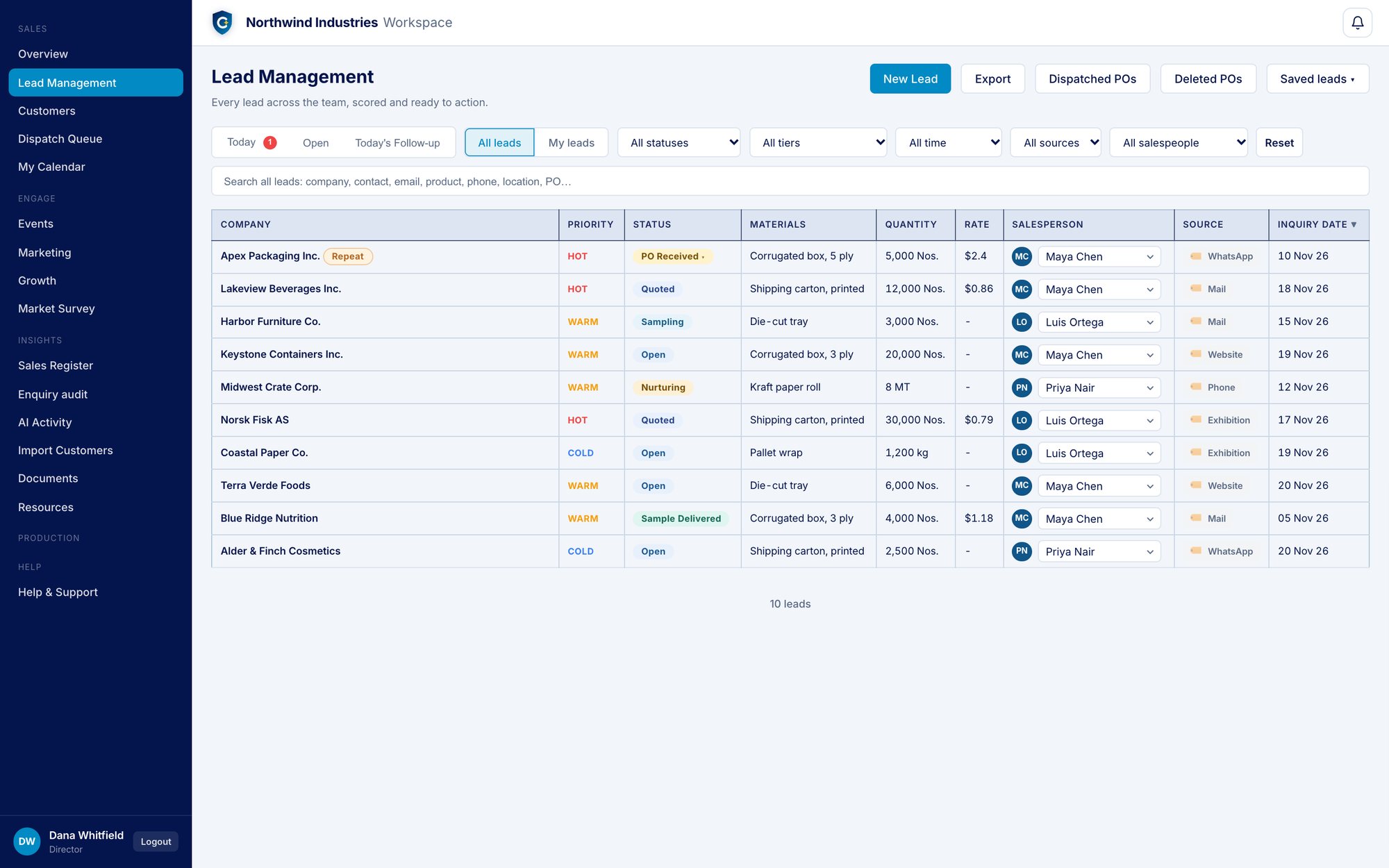
Lead Management Capture every enquiry with its source, score it HOT, WARM or COLD with published rules, and manage each deal on one record from first contact to purchase order. Explore Lead Management Quotations and samples Send quotations the same day in your own email format with the right specification sheet attached, and track every sample from dispatch to customer feedback. Explore Quotations and samples Enquiry audit Upload a week of a mailbox and see every enquiry that never reached the CRM, with Create lead, Assign or Not an enquiry beside each. Rule-based, with no AI. Explore Enquiry audit Document library Maintain each product's certificate of analysis, safety data sheet and specification once, with consistent file names, and attach only library documents to emails. Explore Document library
Deliver
Orders verified before they ship, with a status derived from shipments.
1 module
Get paid
Every receivable followed until its balance is zero.
1 module
Grow
Account health, coverage maps and verified new buyers.
4 modules
Customers Every customer account with its health (new, active, due to reorder or gone quiet), open enquiries, recent orders, products bought and a full rate history. Explore Customers Customer map Every customer on a world map: pin colour shows account health, pin size shows volume bought, and a pulsing ring flags an overdue invoice, a pending shipment or an open deal. Explore Customer map Market Survey and buyer finderoptional For one product: world imports and India's exports from UN Comtrade, importers from customs records, and likely buyers found by AI research and verified on their own websites. Explore Market Survey and buyer finder Marketing and events Build audiences three ways, keep templates in sync with Brevo, run campaigns through a guided wizard and email only contacts who opted in. Includes a trade show list. Explore Marketing and events
AI
Agents that read, verify, draft and remind, and an assistant that answers.
2 modules
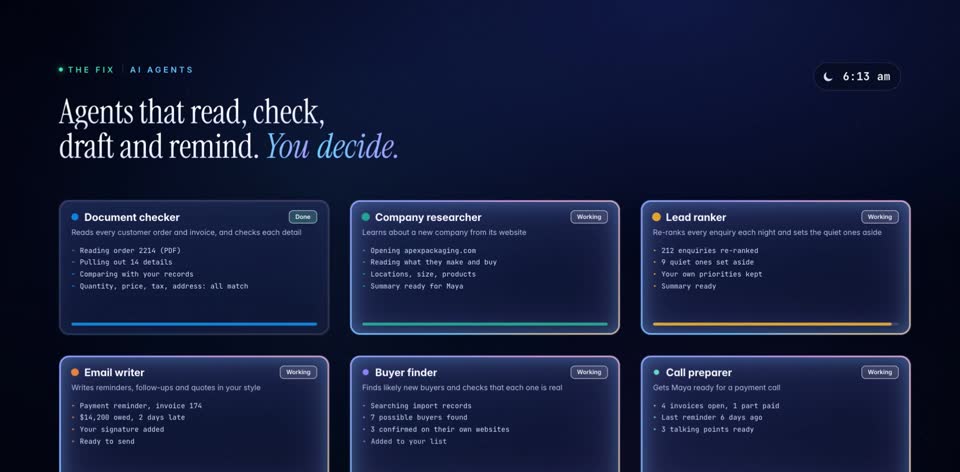
CRM Assistant Ask about leads, orders, quotations, payments and what is due today. Every figure comes from a lookup in your records, within the access of the person asking. Explore CRM Assistant AI agents Six agents with one job each: document checker, company researcher, lead ranker, email writer, buyer finder and call preparer. A person approves everything that leaves. Explore AI agents
Run
The dashboard, the calendar, access control and the plant.
5 modules
My Calendar Follow-ups, expected dispatches, sample feedback, unanswered quotations, payments due and personal reminders on one calendar, by month, week or agenda. Explore My Calendar Overview dashboard The director's live dashboard: pipeline stages, enquiry-to-order conversion by count and by value, top products and a daily brief of what needs attention. Explore Overview dashboard Import customers Upload the Excel or CSV file you already have, map the columns, and your customers and past orders are imported through the same rules as the screens. Explore Import customers Team, roles and access Six roles, page-level grants per person, two-factor authentication required per person, and every authorisation check made on the server. Explore Team, roles and access Production costingoptional A separate workspace for the plant: batch records for the production team, and raw material rates, campaign costing, yield and margin analysis for the director. Explore Production costing
So the next time a buyer requests a price, you respond first.
A 30-minute call: we run one of your real orders through CIM Workspace, from enquiry to payment.